

 NL


iPhone Panic Log uitlezen: zo herken je mogelijke problemen vóór een reparatie
16-11-2026 • Leestijd: 27 min

Een iPhone die onverwacht opnieuw opstart of regelmatig vastloopt, kan wijzen op een onderliggend probleem. Met een iPhone Panic Log kun je aanwijzingen vinden voor mogelijke systeemfouten en gerichter een diagnose stellen.
Ontdek hoe je een Panic Log uitleest, wat de foutcodes betekenen en waarom het controleren van bestaande foutmeldingen vóór een reparatie misverstanden met klanten kan helpen voorkomen.
Wat is een iPhone Panic Log?
Een iPhone Panic Log, ook wel een Panic Full-log genoemd, is een systeemrapport dat een iPhone kan aanmaken wanneer het besturingssysteem een ernstige fout tegenkomt waarvan het niet kan herstellen. Deze systeemfout wordt ook wel een kernel panic genoemd. Een kernel panic kan ervoor zorgen dat de iPhone onverwacht opnieuw opstart. De bijbehorende Panic Log bevat technische informatie over de fout en kan aanwijzingen geven over welk onderdeel of systeem mogelijk problemen veroorzaakt.
Denk bijvoorbeeld aan problemen met sensoren, de batterijcommunicatie, de laadconnector of het moederbord. Ook softwaregerelateerde fouten kunnen een rol spelen.
Een Panic Log vertelt niet altijd precies welk onderdeel defect is. Het rapport vormt vooral een startpunt voor verder onderzoek. Door de foutmelding te combineren met andere controles, kun je gerichter bepalen waar het probleem mogelijk ligt.
Waarom een Panic Log controleren vóór een iPhone-reparatie?
Wanneer een klant een iPhone aanbiedt voor reparatie, is het verstandig om niet alleen naar het gemelde defect te kijken. Soms heeft een toestel al andere problemen die niet direct zichtbaar zijn. Door vóór de reparatie, met toestemming van de klant, bestaande Panic Logs te controleren, kun je mogelijke problemen vroegtijdig signaleren.
Dit biedt verschillende voordelen voor jouw reparatiebedrijf:
Herken bestaande problemen: Ontdek mogelijke systeemfouten voordat je aan een reparatie begint.
Voorkom misverstanden: Bespreek vooraf geregistreerde foutmeldingen met de klant, zodat duidelijk is welke problemen mogelijk al aanwezig waren.
Stel gerichter diagnoses: Gebruik foutcodes als aanwijzing om mogelijke oorzaken sneller te onderzoeken.
Werk professioneler en transparanter: Leg je bevindingen vast en informeer klanten vooraf over eventuele aanvullende problemen.
Praktijkvoorbeeld: bestaande problemen vóór een reparatie herkennen
Een klant brengt zijn iPhone langs voor een displayvervanging. Tijdens de intake controleer je, met toestemming van de klant, de bestaande Panic Logs. Hieruit blijkt dat het toestel eerder een ernstige systeemfout heeft geregistreerd.
Je bespreekt deze bevinding met de klant en legt deze vast voordat je aan de reparatie begint. Start de iPhone na de displayvervanging onverwacht opnieuw op? Dan kun je de eerdere foutmelding gebruiken om te onderzoeken of het probleem al vóór de reparatie aanwezig was.
Zo geef je klanten vooraf meer inzicht in mogelijke bestaande problemen en help je misverstanden na een reparatie voorkomen.

Hoe vind en lees je een Panic Log op een iPhone?
Je kunt bestaande Panic Logs rechtstreeks via de instellingen van een iPhone bekijken. Hiervoor heb je geen aanvullende software nodig.
Volg deze stappen:
Open de Instellingen op de iPhone.
Ga naar Privacy en beveiliging.
Selecteer Analyse en verbeteringen.
Open Analysegegevens.
Zoek naar bestanden die beginnen met panic-full of panic.full.
Open een recent bestand en zoek naar de vermelding panicString.
In de Panic Log vind je technische gegevens over de systeemfout. De panicString bevat vaak belangrijke aanwijzingen over de oorzaak.
Let ook op de datum en tijd van het bestand. Daarmee kun je nagaan wanneer de fout is geregistreerd en of deze aansluit bij de klachten van de klant. Niet iedere iPhone bevat Panic Logs. Wanneer er geen relevante bestanden aanwezig zijn, betekent dit niet automatisch dat het toestel geen defecten heeft.
Wat betekenen de verschillende iPhone Panic Log-foutcodes?
Een Panic Log kan verschillende foutmeldingen bevatten. Sommige verwijzen naar een specifieke sensor, terwijl andere betrekking hebben op een groter onderdeel van het systeem.
Hieronder vind je veelvoorkomende foutmeldingen en hun mogelijke betekenis.
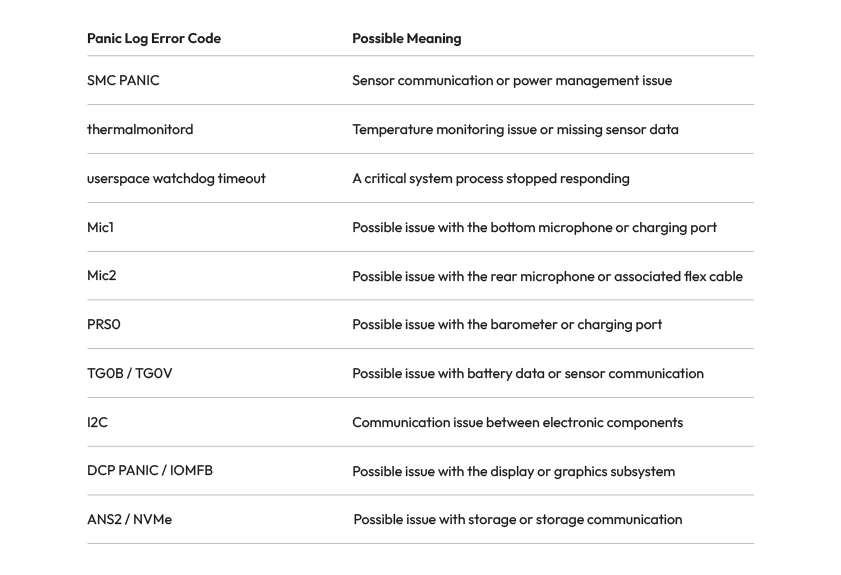
Foutcodes zoals SMC PANIC, thermalmonitord en Mic1 kunnen aanwijzingen geven over mogelijke problemen met sensoren, temperatuurmonitoring of andere onderdelen. De exacte betekenis kan per iPhone-model verschillen. Gebruik deze foutmeldingen daarom als uitgangspunt voor verder onderzoek en niet als definitieve diagnose. Ontdek onderaan deze blog alle iPhone Panic Log-foutcodes en hun betekenis.
Waarom verschillen Panic Log-foutcodes per iPhone-model?
Niet iedere Panic Log-code heeft bij elk iPhone-model dezelfde betekenis.
Bijvoorbeeld: de code 0x200000 kan bij een iPhone 14 wijzen op een probleem met de nabijheidssensor, terwijl dezelfde code bij een standaard iPhone 15 verband kan houden met de draadloze oplaadmodule.
Controleer daarom altijd het exacte iPhone-model voordat je een foutcode aan een specifiek onderdeel koppelt.
Ook kunnen meerdere sensorproblemen tegelijk voorkomen. Een foutcode alleen is daarom onvoldoende om met zekerheid vast te stellen welk onderdeel vervangen moet worden.
Zo gebruik je Panic Logs tijdens de intake van een reparatie
Wil je Panic Logs inzetten binnen jouw reparatiebedrijf? Maak het controleren van bestaande foutmeldingen dan onderdeel van je intakeproces wanneer daar aanleiding voor is. Hieronder delen we drie aandachtspunten die je helpen om deze informatie effectief te gebruiken:
Controleer het toestel vóór de reparatie: Vraag naar bestaande problemen en controleer, met toestemming van de klant, of er relevante Panic Logs aanwezig zijn.
Bespreek foutmeldingen met de klant: Leg uit wat de gevonden foutcodes mogelijk betekenen en bespreek of aanvullend onderzoek nodig is.
Leg je bevindingen vast: Noteer relevante foutmeldingen en de staat van het toestel in de reparatieopdracht. Zo kun je achteraf onderbouwen welke problemen mogelijk al vóór de reparatie aanwezig waren.
Door deze stappen onderdeel te maken van je werkwijze, kun je gerichter diagnoses stellen en misverstanden met klanten helpen voorkomen.
Het juiste iPhone-onderdeel voor jouw reparatie
Wijst een Panic Log op een mogelijk hardwareprobleem? Controleer dan eerst de oorzaak voordat je een onderdeel vervangt.
Bij Foneday vind je meer dan 15.000 smartphoneonderdelen voor professionele reparateurs. Van iPhone-batterijen en displays tot laadconnectoren en andere onderdelen: ontdek ons assortiment en bestel eenvoudig wat je nodig hebt voor jouw volgende reparatie.
Bekijk onze iPhone-onderdelen →

FAQ: veelgestelde vragen over iPhone Panic Logs
Wat is een Panic Log op een iPhone?
Een Panic Log is een systeemrapport dat kan ontstaan wanneer een iPhone een ernstige fout ervaart. Het rapport bevat technische informatie die reparateurs kan helpen om mogelijke hardware- of softwareproblemen te onderzoeken.
Hoe kun je een iPhone Panic Log uitlezen?
Ga naar Instellingen → Privacy en beveiliging → Analyse en verbeteringen → Analysegegevens. Zoek vervolgens naar een bestand met panic-full of panic.full in de naam en controleer de foutmelding bij panicString.
Waarom start de iPhone steeds opnieuw op?
Een iPhone die regelmatig opnieuw opstart, kan problemen hebben met sensoren, batterijcommunicatie, andere hardware of software. Een Panic Log kan aanwijzingen geven over de mogelijke oorzaak, maar aanvullend onderzoek blijft noodzakelijk.
Kun je met een Panic Log zien welk onderdeel defect is?
Niet altijd. Sommige foutcodes verwijzen naar een specifiek onderdeel of een bepaalde sensor, maar dezelfde foutmelding kan meerdere oorzaken hebben. Controleer daarom altijd het iPhone-model en voer aanvullende tests uit voordat je een onderdeel vervangt.
Is het verstandig om vóór een reparatie een Panic Log te controleren?
Ja, vooral wanneer een iPhone onverwacht opnieuw opstart of andere systeemproblemen vertoont. Met toestemming van de klant kun je bestaande Panic Logs controleren en relevante bevindingen vastleggen. Zo kun je mogelijke problemen vooraf bespreken en misverstanden achteraf helpen voorkomen.
Overzicht van iPhone Panic Log-foutcodes per model
Wil je weten wat een specifieke iPhone Panic Log-foutcode betekent? In onderstaand overzicht vind je foutcodes voor verschillende iPhone-modellen, van oudere toestellen tot de nieuwste generaties.
Per foutcode zie je welk onderdeel mogelijk problemen veroorzaakt en hoe betrouwbaar de beschikbare informatie is. Houd er rekening mee dat dezelfde foutcode bij verschillende iPhone-modellen een andere betekenis kan hebben.
Gebruik dit overzicht als hulpmiddel bij het stellen van een diagnose en controleer altijd de exacte oorzaak voordat je een onderdeel vervangt.
General iPhone Panic Log Error Codes
| iPhone Model / Error Family | Error Code | Possible Cause | Confidence |
|---|---|---|---|
| Watchdog | logd | Software (iOS or restored data); no specific component identified | Medium |
| Watchdog | springboard | Software (iOS); no specific component identified | Medium |
| Watchdog | wifid | Check software first; otherwise Wi-Fi/Bluetooth module on the logic board | Low |
| Watchdog | thermalmonitord | Probably software if no missing sensor is reported | Low |
| AOP | bosch | Charging port flex carrying speaker signals | Medium |
| AOP | no_pulse | Taptic Engine, audio codec or upper sensor flex after corrosion | Low |
| AOP | dart | Unknown; linked to a faulty Taptic Engine in one reported case | Low |
| AOP | data_abort | Processor connections or NAND on the logic board | Low |
| AOP | pulse_pearl | Possible Face ID/TrueDepth module; unconfirmed | Low |
| Secure Enclave | sep_rom | SEP ROM chip, EEPROM or connection to the processor | Medium |
| Secure Enclave | sep_panic | Logic board or corrupted firmware/iOS | Low |
| Secure Enclave | sep_mpm | Logic board, Secure Enclave | Low |
| NAND storage | ans2 | NAND storage or communication lines | Medium |
| NAND storage | nvme | NAND storage or power rails | Low |
| NAND storage | ans | NAND storage or communication with the processor | Low |
| NAND storage | h2fmi | NAND or storage controller on older models | Low |
| Display | iomfb | Display assembly; possibly logic board | Low |
| Display | dcp | Display subsystem or logic board; unconfirmed | Low |
| Display | apt-firmware | Possible display assembly; unconfirmed | Low |
| I2C | als | Front camera flex or ambient light sensor | Medium |
| I2C | audio-speaker-top | Earpiece speaker or front camera/sensor flex | Low |
| I2C | roswell | Display or touchscreen controller | Low |
| I2C | display-pmu | OLED display power circuit | Low |
| I2C | display-eeprom | Display or I2C3 connection on the logic board | Low |
| I2C | ad5860 | Charging port flex or Taptic Engine | Medium |
| I2C | mic-temp-sens | Possible Lightning charging port flex | Low |
| I2C | i2c2 | Front camera flex or other components on the same bus | Low |
| I2C | i2c3 | Display, touchscreen, display connector or charging port | Low |
| Processor | sochot | Logic board, power management or overheating; check Wi-Fi/audio areas | Medium |
| Processor | amcc | Processor, memory or cache controller | Low |
| Processor | pmp | Processor power supply | Low |
| Processor | sleepwake | Software or possibly audio codec/processor power supply | Low |
| Wi-Fi/Bluetooth | wlan | Wi-Fi/Bluetooth module or antenna | Medium |
| Modem | baseband | Baseband modem on the logic board | Low |
| Software | undef_instr | iOS or incompatible app; possibly RAM/NAND | Medium |
| Software | physmap-fault | Software first; possibly memory or logic board | Low |
| Software | ifetch_abort | Software or logic board; cause unknown | Low |
| Software | ppl | Kernel software or memory corruption | Low |
| Unknown | socd-ap-wdt | Unresponsive processor; investigate software first | Low |
| Unknown | socd-iboot | Unknown; additional information in SOCDContainers | Low |
| Unknown | mfm-port-enable | Possible Wi-Fi/Bluetooth or PCIe connection; unconfirmed | Low |
| Processor | fed-l1c-iside-parity | Processor or logic board, instruction cache error | Low |
| Processor | halt_cpu | Secondary message; check the main panic code | Low |
| Watchdog | Not specified | Usually software; possibly hardware if the issue persists after restoring | Low |
| AOP | Not specified | Power button flex or front camera assembly | Medium |
| AOP | Not specified | Sensor connected to the AOP coprocessor; component unknown | Low |
| I2C | Not specified | Component on the affected I2C bus; model-dependent | Low |
| SMC | Not specified | Components on the SMC I2C master bus | Low |
| SMC | Not specified | Processor power rails and inductors | Low |
| SMC | data_abort | Processor communication on the logic board | Low |
| Software | data_abort | Software, graphics driver or possibly hardware | Low |
iPhone 7, 8, X, XR, XS, SE, 11 and 12 – Error Codes
| iPhone Model / Error Family | Error Code | Possible Cause | Confidence |
|---|---|---|---|
| iPhone 7 | tg0b | Battery or battery connector | High |
| iPhone 7 Plus | tg0b | Battery or battery connector | High |
| iPhone 8 | tg0b | Battery or battery connector | Medium |
| iPhone 8 Plus | tg0b | Battery or battery connector | Medium |
| iPhone X | tg0b | Battery, connector or data lines | High |
| iPhone X | tg0v | Battery, connector or data lines | High |
| iPhone SE (1st generation) | tg0b | Battery or resistor near the battery connector | Medium |
| iPhone SE (1st generation) | tg0v | Battery or data lines | Low |
| iPhone 7 | tg0v | Battery or data lines | Low |
| iPhone 7 Plus | tg0v | Battery or data lines | Low |
| iPhone 8 | tg0v | Battery or data lines | Low |
| iPhone 8 Plus | tg0v | Battery or data lines | Low |
| iPhone X | prs0 | Charging port flex or barometer | High |
| iPhone X | mic1 | Charging port flex or bottom microphone | Medium |
| iPhone 7 | mic1 | Charging port flex or bottom microphone | Low |
| iPhone 7 Plus | mic1 | Charging port flex or bottom microphone | Low |
| iPhone 8 | mic1 | Charging port flex or bottom microphone | Low |
| iPhone 8 Plus | mic1 | Charging port flex or bottom microphone | Low |
| iPhone 7 | prs0 | Charging port flex or barometer | Low |
| iPhone 7 Plus | prs0 | Charging port flex or barometer | Low |
| iPhone 8 | prs0 | Charging port flex or barometer | Low |
| iPhone 8 Plus | prs0 | Charging port flex or barometer | Low |
| iPhone X | mic2 | Power button/flash flex or rear microphone | Low |
| iPhone 7 | mic2 | Power button/flash flex or rear microphone | Low |
| iPhone 7 Plus | mic2 | Power button/flash flex or rear microphone | Low |
| iPhone 8 | mic2 | Power button/flash flex or rear microphone | Low |
| iPhone 8 Plus | mic2 | Power button/flash flex or rear microphone | Low |
| iPhone 8 | tp1a | Temperature sensor on the logic board | Medium |
| iPhone X | tp1a | Temperature sensor on the logic board | Low |
| iPhone SE (1st generation) | tp1a | Temperature sensor near the rear camera | Low |
| iPhone SE (1st generation) | tp3r | Temperature sensor on the logic board | Low |
| iPhone XS Max | tp3r | Temperature sensor on the logic board | Low |
| iPhone SE (2nd generation) | prs0 | Charging port flex or barometer | High |
| iPhone XR | prs0 | Charging port flex or barometer | High |
| iPhone XS | prs0 | Charging port flex or barometer | High |
| iPhone XS Max | prs0 | Charging port flex or barometer | High |
| iPhone 11 | prs0 | Charging port flex or barometer | High |
| iPhone 11 Pro | prs0 | Charging port flex or barometer | High |
| iPhone 11 Pro Max | prs0 | Charging port flex or barometer | High |
| iPhone 12 | prs0 | Charging port flex or barometer | High |
| iPhone 12 mini | prs0 | Charging port flex or barometer | High |
| iPhone 12 Pro | prs0 | Charging port flex or barometer | High |
| iPhone 12 Pro Max | prs0 | Charging port flex or barometer | High |
| iPhone SE (2nd generation) | mic1 | Charging port flex or I2C connection on the logic board | Medium |
| iPhone XR | mic1 | Charging port flex, bottom microphone | High |
| iPhone XS | mic1 | Charging port flex, bottom microphone | High |
| iPhone XS Max | mic1 | Charging port flex, bottom microphone | High |
| iPhone 11 | mic1 | Charging port flex, bottom microphone | High |
| iPhone 11 Pro | mic1 | Charging port flex, bottom microphone | High |
| iPhone 11 Pro Max | mic1 | Charging port flex, bottom microphone | High |
| iPhone 12 | mic1 | Charging port flex, bottom microphone | High |
| iPhone 12 mini | mic1 | Charging port flex, bottom microphone | High |
| iPhone 12 Pro | mic1 | Charging port flex, bottom microphone | High |
| iPhone 12 Pro Max | mic1 | Charging port flex, bottom microphone | High |
| iPhone SE (2nd generation) | mic2 | Power button flex or secondary microphone | High |
| iPhone XR | mic2 | Power button flex or secondary microphone | High |
| iPhone XS | mic2 | Power button flex or secondary microphone | High |
| iPhone XS Max | mic2 | Power button flex or secondary microphone | High |
| iPhone 11 | mic2 | Power button flex or secondary microphone | High |
| iPhone 11 Pro | mic2 | Power button flex or secondary microphone | High |
| iPhone 11 Pro Max | mic2 | Power button flex or secondary microphone | High |
| iPhone 12 | mic2 | Power button flex or secondary microphone | High |
| iPhone 12 mini | mic2 | Power button flex or secondary microphone | High |
| iPhone 12 Pro | mic2 | Power button flex or secondary microphone | High |
| iPhone 12 Pro Max | mic2 | Power button flex or secondary microphone | High |
| iPhone SE (2nd generation) | tg0b | Battery or data line | High |
| iPhone XR | tg0b | Battery or data line | High |
| iPhone XS | tg0b | Battery or data line | High |
| iPhone XS Max | tg0b | Battery or data line | High |
| iPhone 11 | tg0b | Battery or data line | High |
| iPhone 11 Pro | tg0b | Battery or charging port flex | High |
| iPhone 11 Pro Max | tg0b | Battery or charging port flex | High |
| iPhone 12 | tg0b | Battery or data line | High |
| iPhone 12 mini | tg0b | Battery or data line | High |
| iPhone 12 Pro | tg0b | Battery or data line | High |
| iPhone 12 Pro Max | tg0b | Battery or data line | High |
| iPhone SE (2nd generation) | tg0v | Battery or data line | High |
| iPhone XR | tg0v | Battery or data line | High |
| iPhone XS | tg0v | Battery or data line | High |
| iPhone XS Max | tg0v | Battery or data line | High |
| iPhone 11 | tg0v | Battery or data line | High |
| iPhone 11 Pro | tg0v | Battery or charging port flex | High |
| iPhone 11 Pro Max | tg0v | Battery or charging port flex | High |
| iPhone 12 | tg0v | Battery or data line | High |
| iPhone 12 mini | tg0v | Battery or data line | High |
| iPhone 12 Pro | tg0v | Battery or data line | High |
| iPhone 12 Pro Max | tg0v | Battery or data line | High |
| iPhone SE (2nd generation) | tb0v | Battery | Low |
| iPhone XR | tb0v | Battery | Low |
| iPhone XS | tb0v | Battery | Low |
| iPhone XS Max | tb0v | Battery | Low |
| iPhone 11 | tb0v | Battery | Low |
| iPhone 11 Pro | tb0v | Battery | Low |
| iPhone 11 Pro Max | tb0v | Battery | Low |
| iPhone 12 | tb0v | Battery | Low |
| iPhone 12 mini | tb0v | Battery | Low |
| iPhone 12 Pro | tb0v | Battery | Low |
| iPhone 12 Pro Max | tb0v | Battery | Low |
| iPhone 12 | eiger | Charging port flex | Low |
| iPhone 12 mini | eiger | Charging port flex | Low |
| iPhone 12 Pro | eiger | Charging port flex | Low |
| iPhone 12 Pro Max | eiger | Charging port flex | Low |
| iPhone 12 | tp3r | Temperature sensor on the logic board | Low |
| iPhone 12 mini | tp3r | Temperature sensor on the logic board | Low |
| iPhone 12 Pro | tp3r | Temperature sensor on the logic board | Low |
| iPhone 12 Pro Max | tp3r | Temperature sensor on the logic board | Low |
| iPhone XR | i2c0 | Charging port flex; possibly camera, battery connector or sensor flex | Medium |
| iPhone XS | i2c0 | Charging port flex; possibly camera, battery connector or sensor flex | Medium |
| iPhone XS Max | i2c0 | Charging port flex; possibly camera, battery connector or sensor flex | Medium |
| iPhone 7 | Not specified | Light sensor, microphone, power button flex or Touch ID flex | Low |
| iPhone 7 Plus | Not specified | Light sensor, microphone, power button flex or Touch ID flex | Low |
| iPhone 8 | Not specified | Light sensor, microphone, power button flex or Touch ID flex | Low |
| iPhone 8 Plus | Not specified | Light sensor, microphone, power button flex or Touch ID flex | Low |
| iPhone X | Not specified | Light sensor, microphone, power button flex or Touch ID flex | Low |
| iPhone SE (2nd generation) | Not specified | Light sensor, microphone, power button flex or Touch ID flex | Low |
| iPhone SE (3rd generation) | 0x10000 | Possible power button flex; unconfirmed | Low |
iPhone 13 – SMC PANIC Error Codes
| iPhone Model / Error Family | Error Code | Possible Cause | Confidence |
|---|---|---|---|
| iPhone 13 | 0x800 | Charging port flex (Lightning) | High |
| iPhone 13 mini | 0x800 | Charging port flex (Lightning) | High |
| iPhone 13 Pro | 0x800 | Charging port flex (Lightning) | High |
| iPhone 13 Pro Max | 0x800 | Charging port flex (Lightning) | High |
| iPhone 13 | 0x1000 | Front sensor flex, proximity/ambient light sensor | High |
| iPhone 13 mini | 0x1000 | Front sensor flex, proximity/ambient light sensor | High |
| iPhone 13 Pro | 0x1000 | Front sensor flex, proximity/ambient light sensor | High |
| iPhone 13 Pro Max | 0x1000 | Front sensor flex, proximity/ambient light sensor | High |
| iPhone 13 | 0x10000 | Front sensor flex; source may be incorrect | Low |
| iPhone 13 mini | 0x10000 | Front sensor flex; source may be incorrect | Low |
| iPhone 13 Pro | 0x10000 | Front sensor flex; source may be incorrect | Low |
| iPhone 13 Pro Max | 0x10000 | Front sensor flex; source may be incorrect | Low |
| iPhone 13 | 0x4000 | Battery data or communication | Medium |
| iPhone 13 mini | 0x4000 | Battery data or communication | Medium |
| iPhone 13 Pro | 0x4000 | Battery data or communication | Medium |
| iPhone 13 Pro Max | 0x4000 | Battery data or communication | Medium |
| iPhone 13 | 0x40000 | Battery; source may be incorrect | Low |
| iPhone 13 mini | 0x40000 | Battery; source may be incorrect | Low |
| iPhone 13 Pro | 0x40000 | Battery; source may be incorrect | Low |
| iPhone 13 Pro Max | 0x40000 | Battery; source may be incorrect | Low |
| iPhone 13 | 0x1800 | Charging port flex and front sensor flex | High |
| iPhone 13 mini | 0x1800 | Charging port flex and front sensor flex | High |
| iPhone 13 Pro | 0x1800 | Charging port flex and front sensor flex | High |
| iPhone 13 Pro Max | 0x1800 | Charging port flex and front sensor flex | High |
| iPhone 13 mini | 0x400 | Gyroscope on the lower logic board | High |
| iPhone 13 mini | 0xc00 | Lower logic board and charging port flex | Low |
iPhone 14 and 14 Plus – SMC PANIC Error Codes
| iPhone Model / Error Family | Error Code | Possible Cause | Confidence |
|---|---|---|---|
| iPhone 14 | 0x100000 | Charging port flex | High |
| iPhone 14 Plus | 0x100000 | Charging port flex | High |
| iPhone 14 | 0x200000 | Proximity sensor | High |
| iPhone 14 Plus | 0x200000 | Proximity sensor | High |
| iPhone 14 | 0x400000 | Wireless charging coil (MagSafe) | High |
| iPhone 14 Plus | 0x400000 | Wireless charging coil (MagSafe) | High |
| iPhone 14 | 0x300000 | Charging port flex and proximity sensor | High |
| iPhone 14 Plus | 0x300000 | Charging port flex and proximity sensor | High |
| iPhone 14 | 0x500000 | Charging port flex and wireless charging coil; possibly battery | Medium |
| iPhone 14 Plus | 0x500000 | Charging port flex and wireless charging coil; possibly battery | Medium |
| iPhone 14 | 0x600000 | Wireless charging coil and proximity sensor | High |
| iPhone 14 Plus | 0x600000 | Wireless charging coil and proximity sensor | High |
| iPhone 14 | 0x700000 | Charging port, wireless charging coil and proximity sensor | High |
| iPhone 14 Plus | 0x700000 | Charging port, wireless charging coil and proximity sensor | High |
| iPhone 14 | 0x20000 | Connection between logic board layers | Low |
| iPhone 14 Plus | 0x20000 | Connection between logic board layers | Low |
| iPhone 14 | 0x40000000 | Battery temperature/voltage sensors (TB0T/TB0V) | Medium |
| iPhone 14 Plus | 0x40000000 | Battery temperature/voltage sensors (TB0T/TB0V) | Medium |
iPhone 14 Pro and Pro Max – SMC PANIC Error Codes
| iPhone Model / Error Family | Error Code | Possible Cause | Confidence |
|---|---|---|---|
| iPhone 14 Pro | 0x41 | Battery data | High |
| iPhone 14 Pro Max | 0x41 | Battery data | High |
| iPhone 14 Pro | 0x20000 | Gyroscope or connection between logic board layers | High |
| iPhone 14 Pro Max | 0x20000 | Gyroscope or connection between logic board layers | High |
| iPhone 14 Pro | 0x40000 | Charging port flex | High |
| iPhone 14 Pro Max | 0x40000 | Charging port flex | High |
| iPhone 14 Pro | 0x80000 | Front sensor flex, proximity sensor | High |
| iPhone 14 Pro Max | 0x80000 | Front sensor flex, proximity sensor | High |
| iPhone 14 Pro | 0x100000 | Power button flex | High |
| iPhone 14 Pro Max | 0x100000 | Power button flex | High |
| iPhone 14 Pro | 0xc0000 | Charging port flex and front sensor flex | High |
| iPhone 14 Pro Max | 0xc0000 | Charging port flex and front sensor flex | High |
| iPhone 14 Pro | 0x180000 | Front sensor flex and power button flex | Low |
| iPhone 14 Pro Max | 0x180000 | Front sensor flex and power button flex | Low |
| iPhone 14 Pro | 0x140000 | Power button flex and charging port flex | Low |
| iPhone 14 Pro Max | 0x140000 | Power button flex and charging port flex | Low |
| iPhone 14 Pro | 0x1c0000 | Charging port, power button and front sensors | Medium |
| iPhone 14 Pro Max | 0x1c0000 | Charging port, power button and front sensors | Medium |
| iPhone 14 Pro | 0xa0000 | Gyroscope/logic board connection and front sensor flex | Low |
| iPhone 14 Pro Max | 0xa0000 | Gyroscope/logic board connection and front sensor flex | Low |
| iPhone 14 Pro | 0x1400000 | USB module circuit, microphone component or connection to power management | High |
| iPhone 14 Pro Max | 0x1400000 | USB module circuit, microphone component or connection to power management | High |
| iPhone 14 Pro | 0x1800000 | Proximity sensor module or internal electronics | High |
| iPhone 14 Pro Max | 0x1800000 | Proximity sensor module or internal electronics | High |
iPhone 15 and 15 Plus – SMC PANIC Error Codes
| iPhone Model / Error Family | Error Code | Possible Cause | Confidence |
|---|---|---|---|
| iPhone 15 | 0xa1 | Battery data | High |
| iPhone 15 Plus | 0xa1 | Battery data | High |
| iPhone 15 | 0x80000 | USB-C charging port flex or barometer | High |
| iPhone 15 Plus | 0x80000 | USB-C charging port flex or barometer | High |
| iPhone 15 | 0x100000 | Front sensor flex, proximity sensor | High |
| iPhone 15 Plus | 0x100000 | Front sensor flex, proximity sensor | High |
| iPhone 15 | 0x200000 | Wireless charging coil (MagSafe) | High |
| iPhone 15 Plus | 0x200000 | Wireless charging coil (MagSafe) | High |
| iPhone 15 | 0x280000 | Wireless charging coil and charging port flex | Low |
| iPhone 15 Plus | 0x280000 | Wireless charging coil and charging port flex | Low |
| iPhone 15 | 0x380000 | Wireless charging coil, charging port and front sensors | Low |
| iPhone 15 Plus | 0x380000 | Wireless charging coil, charging port and front sensors | Low |
iPhone 15 Pro and Pro Max – SMC PANIC Error Codes
| iPhone Model / Error Family | Error Code | Possible Cause | Confidence |
|---|---|---|---|
| iPhone 15 Pro | 0xa1 | Battery data | High |
| iPhone 15 Pro Max | 0xa1 | Battery data | High |
| iPhone 15 Pro | 0x100000 | USB-C charging port flex | Medium |
| iPhone 15 Pro Max | 0x100000 | USB-C charging port flex | Medium |
| iPhone 15 Pro | 0x200000 | Front sensor flex, proximity sensor | High |
| iPhone 15 Pro Max | 0x200000 | Front sensor flex, proximity sensor | High |
| iPhone 15 Pro | 0x300000 | USB-C charging port flex, possibly also front sensor flex | High |
| iPhone 15 Pro Max | 0x300000 | USB-C charging port flex, possibly also front sensor flex | High |
| iPhone 15 Pro | 0x400000 | Wireless charging coil (MagSafe) | High |
| iPhone 15 Pro Max | 0x400000 | Wireless charging coil (MagSafe) | High |
| iPhone 15 Pro | 0x500000 | Charging port flex and wireless charging coil | High |
| iPhone 15 Pro Max | 0x500000 | Charging port flex and wireless charging coil | High |
| iPhone 15 Pro | 0x600000 | Wireless charging coil and proximity sensor | High |
| iPhone 15 Pro Max | 0x600000 | Wireless charging coil and proximity sensor | High |
| iPhone 15 Pro | 0x700000 | Charging port, wireless charging coil and possibly proximity sensor | High |
| iPhone 15 Pro Max | 0x700000 | Charging port, wireless charging coil and possibly proximity sensor | High |
| iPhone 15 Pro | 0x1000000 | USB module circuit, microphone component or connection to power management | High |
| iPhone 15 Pro Max | 0x1000000 | USB module circuit, microphone component or connection to power management | High |
iPhone 16, 16 Plus and 16e – SMC PANIC Error Codes
| iPhone Model / Error Family | Error Code | Possible Cause | Confidence |
|---|---|---|---|
| iPhone 16e | 0x80000 | Possible USB-C charging port flex or barometer; unconfirmed | Low |
| iPhone 16 | 0x80000 | USB-C charging port flex or barometer | Medium |
| iPhone 16 Plus | 0x80000 | USB-C charging port flex or barometer | Medium |
| iPhone 16 | 0x180000 | Charging port flex or barometer | Low |
| iPhone 16 Plus | 0x180000 | Charging port flex or barometer | Low |
| iPhone 16 | 0x200000 | Wireless charging coil | Medium |
| iPhone 16 Plus | 0x200000 | Wireless charging coil | Medium |
| iPhone 16 | 0xa9 | Battery communication | Low |
| iPhone 16 Plus | 0xa9 | Battery communication | Low |
| iPhone 16 | 0x380000 | Charging port and wireless charging coil or connection between logic board layers | Low |
| iPhone 16 Plus | 0x380000 | Charging port and wireless charging coil or connection between logic board layers | Low |
iPhone 16 Pro and Pro Max – SMC PANIC Error Codes
| iPhone Model / Error Family | Error Code | Possible Cause | Confidence |
|---|---|---|---|
| iPhone 16 Pro | 0x300000 | USB-C charging port flex or barometer | High |
| iPhone 16 Pro Max | 0x300000 | USB-C charging port flex or barometer | High |
| iPhone 16 Pro | 0x200000 | Charging port assembly, microphone or barometer; disputed interpretation | Low |
| iPhone 16 Pro Max | 0x200000 | Charging port assembly, microphone or barometer; disputed interpretation | Low |
| iPhone 16 Pro | 0x100000 | USB-C charging port flex | Low |
| iPhone 16 Pro Max | 0x100000 | USB-C charging port flex | Low |
| iPhone 16 Pro | 0xa9 | Battery communication | Low |
| iPhone 16 Pro Max | 0xa9 | Battery communication | Low |
| iPhone 16 Pro | 0x400000 | Wireless charging coil or logic board connector | Low |
| iPhone 16 Pro Max | 0x400000 | Wireless charging coil or logic board connector | Low |
iPhone 17 Pro, Pro Max, Air and 18 Pro
| iPhone Model / Error Family | Error Code | Possible Cause | Confidence |
|---|---|---|---|
| iPhone 17 Pro | 0x800000 | Wireless charging coil | Low |
| iPhone 17 Pro Max | 0x800000 | Wireless charging coil | Low |
| iPhone 17 Pro | 0x600000 | USB-C charging port flex or barometer | Low |
| iPhone 17 Pro Max | 0x600000 | USB-C charging port flex or barometer | Low |
| iPhone 17 Pro | 0x200000 | USB-C charging port or barometer module | Low |
| iPhone 17 Pro Max | 0x200000 | USB-C charging port or barometer module | Low |
| iPhone Air | 0x2000000 | Wireless charging coil | Low |
| iPhone Air | 0x3800000 | USB-C charging port flex or barometer | Low |
| iPhone 18 Pro | 0xa9 | Battery temperature sensor (TB0T) | Low |
Belangrijk: Deze foutcodes wijzen op mogelijke oorzaken en vormen geen definitieve diagnose. De betekenis kan per iPhone-model verschillen. Controleer altijd de volledige Panic Log en test de relevante onderdelen voordat je deze vervangt. Foutcodes met een lage betrouwbaarheid zijn niet bevestigd of gebaseerd op beperkte informatie.
Blijf daarnaast op de hoogte van de laatste ontwikkelingen door onze blogs te lezen en ons te volgen op LinkedIn en YouTube


